Skip to content
KUPF Services
Products
KUPFticket.com
kulturspenden.at
News
Pricing
FAQ
About Us
Login
Create a Store
en
de
Rebook tickets
FAQ
/
Tickets & Ticketverkauf
App access
Cancel an event
Create an event
Create an event series
Create and edit categories
Customize tickets
Data export: sold tickets & statistics
Discounts & promo codes
Enable voucher sales
How do I create free tickets?
Issue a refund
kulturspenden – buttons & banners
kulturspenden – create a donation campaign
kulturspenden – donation receipt
kulturspenden – FAQs of the tax office
kulturspenden – fee overview
kulturspenden – payouts
kulturspenden – statutes checked yet?
kulturspenden – tax-deductible donations since 1 Jan 2024
Marketing – logos and patches
Maximum number of tickets per order
Payouts
Point of sale – add a register and card terminal
Point of sale – buy or rent hardware
Point of sale – configure ticket printer
Point of sale – general info
Point of sale – how do I sell tickets?
Point of sale – reservations
Point of sale – ticket rolls
Rebook tickets
Receive payout confirmations by email
Register not found
Sales mode
Scan & POS app download
Scan & POS app login
Seating charts – block individual seats
Seating charts – create
Service hotline for shop operators
Set up multilingual events
Step-by-step guide: create and activate your shop
Stripe has blocked my shop
Tap to Pay
Ticket details
Ticket personalization
User management
Visibility of your event
Which payment methods are supported?
Who can use KUPFticket?
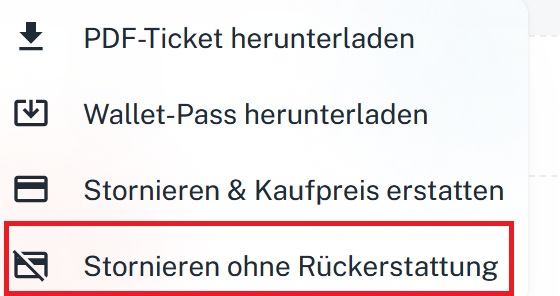
Step:
Cancel the ticket without a refund.
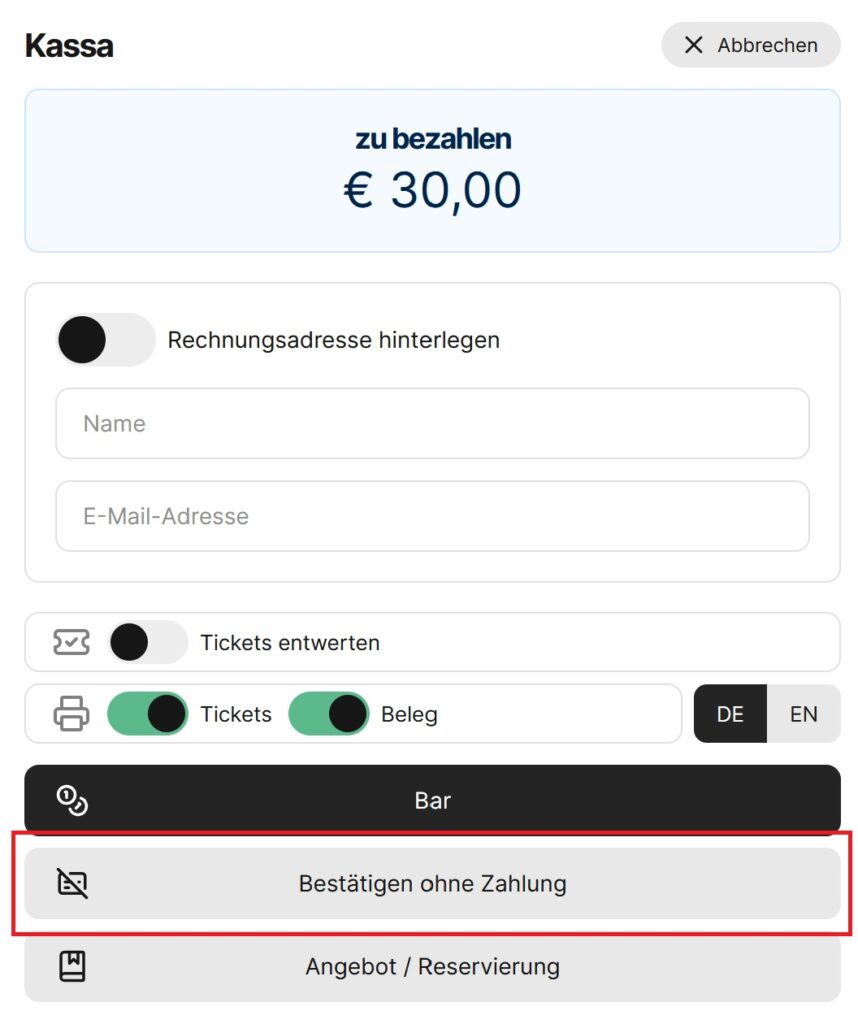
2.
Step
: Book the new ticket via the point of sale “without invoicing”.
←
How do I create free tickets?
Maximum number of tickets per order
→